`
- [RenderResult](https://testing-library.com/docs/react-testing-library/api/#render-result)
## Act
```jsx
import { render, screen } from "@testing-library/react";
import userEvent from "@testing-library/user-event";
it("點擊名稱時,會顯示或隱藏 sub rows", () => {
// ...
// [Act]
// - 點擊名稱
userEvent.click(screen.getByText("麵類"));
// ...
});
```
- 透過 `@testing-library/dom` 的 `screen` 可以讀到上面說的 `document.body`,並且提供 API 讓我們可以指到裡面的特定元素
- 透過 `@testing-library/user-event`,可以在 `jsdom` 中模擬使用者在瀏覽器的行為
- `user-event@14` 要 React 18,目前我們是用 [`user-event@13`](https://testing-library.com/docs/ecosystem-user-event),看官網文件和範例要小心版本。
## Assert
```jsx
it("點擊名稱時,會顯示或隱藏 sub rows", () => {
// ...
// [Assert]
// - 確認對應的 sub-rows 出現在畫面中
const resultRows = screen.getAllByRole("row");
expect(screen.getByText("白醬海鮮義大利麵")).toBeInTheDocument();
expect(screen.getByText("番茄肉醬義大利麵")).toBeInTheDocument();
expect(resultRows.length).toBe(6);
// ...
});
```
- 同 Act,透過 `@testing-library/dom` 的 `screen` 可以讀到上面說的 `document.body`,並且提供 API 讓我們可以指到裡面的特定元素
- `expect().toBeInTheDocument()` 哪來的?:
- setupTest.js:
```javascript
import "@testing-library/jest-dom";
```
- [`@testing-library/jest-dom`](https://github.com/testing-library/jest-dom) 會執行 Jest 的 `expect.extend(extensions)` 注入擴充方法
## 怎麼在 screen 上取得要的元素?
- `@testing-library/dom` 的各種 queries API
### queries分類:依搜尋條件
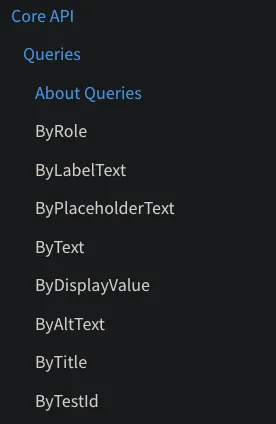
- 怎麼選要用哪種方法?用跟使用者行為最像的,上面官網的排序就是照作者建議的順序(越上面越優先): https://testing-library.com/docs/queries/about/#priority
- 條件都是給 [TextMatch](https://testing-library.com/docs/queries/about/#textmatch),只傳單純字串是 exact match
```javascript
// Matching a string:
screen.getByText("Hello World"); // full string match
screen.getByText("llo Worl", { exact: false }); // substring match
screen.getByText("hello world", { exact: false }); // ignore case
// Matching a regex:
screen.getByText(/World/); // substring match
screen.getByText(/world/i); // substring match, ignore case
screen.getByText(/^hello world$/i); // full string match, ignore case
screen.getByText(/Hello W?oRlD/i); // substring match, ignore case, searches for "hello world" or "hello orld"
// Matching with a custom function:
screen.getByText((content, element) => content.startsWith("Hello"));
```
### queries分類:依行為 get, query, find
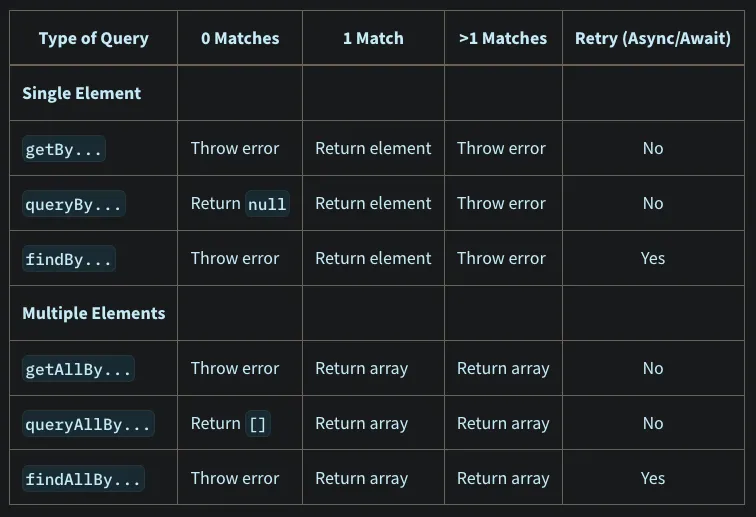
- 所以舉例來說,`ByRole` 就會有 `getByRole`, `queryByRole`, `findByRole`, `getAllByRole`, `queryAllByRole`, `findAllByRole`
### withIn
- 找在特定元素底下的元素
- Ref: [withIn](https://testing-library.com/docs/dom-testing-library/api-within)
```javascript
import { render, screen, within } from "@testing-library/react";
render(
);
const messages = screen.getByText("messages");
const helloMessage = within(messages).getByText("hello");
```
## 更多關於 Arrange
### 可以檢查 render 的結果嗎?
- 用 `const { debug } = render()` 或 `screen.debug()` 看 render 結果:
- 會 log 出經過 `prettyDOM` 排版的 `document.body`:
```htmlmixed
```
### 自動清理
- `jsdom` 會根據檔案產生 jsdom instance。換句話說不同檔案之間的模擬 DOM 是獨立的。([refA](https://github.com/facebook/jest/issues/1224), [refB](https://stackoverflow.com/a/72984394/5814542))
- 換句話說,在同一個 test file 裡面的不同 test 是共享同一個 jsdom instance,同樣的 DOM。
- `@testing-library/react` 會自動在 `afterEach` 把 component umnount,不用自己 umnount. ([ref](https://testing-library.com/docs/react-testing-library/api/#cleanup))
## 更多關於 Act
### `user-event` 跟 `fireEvent` 差在哪?
- [`fireEvent`](https://testing-library.com/docs/dom-testing-library/api-events): 封裝後的 DOM event dispatcher,基本上還是一次呼叫對應一個 event
- [`user-event`](https://testing-library.com/docs/ecosystem-user-event): 設計成介面是使用者行為,一個行為可能觸發各種 event
- 作者建議優先使用 `user-event`,但目前不一定所有使用者行為都有實作到
### 怎麼知道行為更新完畫面了?
- 無論是 13 或 14 都已經透過 `@testing-library/react` 把各 libray API 設計成不需要在更新狀態時包 `react-dom/test-utils` 的 `act`。
- 如果還是出現 warning,通常是程式有非同步行為,造成的測試沒有寫好、沒等到行為完成。可參考:
- [wrapping updates with `act` is neither required nor recommended](https://github.com/testing-library/user-event/discussions/906)
- [Fix the not wrapped in act warning](https://kentcdodds.com/blog/fix-the-not-wrapped-in-act-warning)
- [Async Methods](https://testing-library.com/docs/dom-testing-library/api-async). [Example](https://testing-library.com/docs/example-findByText):
```javascript
it("should show invalid field errors for each invalid input field", async () => {
const { user } = renderApp();
const userNameField = screen.getByPlaceholderText("Enter user name");
const passwordField = screen.getByPlaceholderText("Enter password");
await user.type(userNameField, "Philchard");
await user.type(passwordField, "theCat");
userEvent.click(
screen.getByRole("button", {
name: "Login",
}),
); // need await if @14
expect(await screen.findByText("Invalid User Name")).toBeVisible();
expect(await screen.findByText("Invalid Password")).toBeVisible();
});
```
- `user-event@13` 方法幾乎都是同步的(不需要 await 行為完成,只有[一個例外](https://testing-library.com/docs/ecosystem-user-event/#api)。但 `user-event@14` 都改成非同步了,如果升版會要 await。
## 更多關於 Assert
### 怎麼選擇 query 的方式?
- 如前所述,作者建議選跟使用者行為最像的:https://testing-library.com/docs/queries/about/#priority
- 為什麼作者最推薦用 role?作者的理想是網站實作較完整的 accecibilities。他想要機器讀到的網站結構,可以跟視覺 end user 讀到的視覺結構是一致的。這樣就可以假設測試模擬的行為跟視覺或聽覺使用者的行為都一致。
- 不過因為實際上我們沒有做 accecibilities,所以網站並沒有完整的 aria- 等結構,只有特定 HTML element 本身的 role。在這樣的情況下,通常會用 text 來尋找。而沒有文字的就要用 test id 或 alt text 來尋找元素。
### 怎麼查 role?
- 清單:[HTML spec](https://www.w3.org/TR/html-aria/#docconformance), [MDN](https://developer.mozilla.org/en-US/docs/Web/Accessibility/ARIA/ARIA_Techniques#roles)
- [`screen.logTestingPlaygroundURL()`](https://testing-library.com/docs/queries/about/#screenlogtestingplaygroundurl)
- [`logRoles`](https://testing-library.com/docs/dom-testing-library/api-debugging#logroles)
- Browser 開發者工具
### 不同時機的 query 結果是不同的
範例:`resultRows` 和 `prevRows` capture 到的是各自在呼叫的時間點符合條件的內容
```javascript
userEvent.click(screen.getByText("麵類"));
// [Assert]
const resultRows = screen.getAllByRole("row");
expect(testCaseProps.onExpandedRowsChange).lastCalledWith(["1", "2"]);
expect(screen.getByText("白醬海鮮義大利麵")).toBeInTheDocument();
expect(screen.getByText("番茄肉醬義大利麵")).toBeInTheDocument();
expect(resultRows.length).toBe(6);
// [Act] 收合麵類 subrows
userEvent.click(screen.getByText("麵類"));
// [Assert]
const prevRows = screen.getAllByRole("row");
expect(testCaseProps.onExpandedRowsChange).lastCalledWith(["2"]);
expect(screen.queryByText("白醬海鮮義大利麵")).not.toBeInTheDocument();
expect(screen.queryByText("番茄肉醬義大利麵")).not.toBeInTheDocument();
expect(prevRows.length).toBe(4);
```